
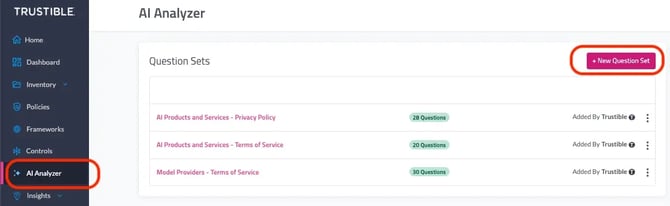
Click on the AI Analyzer tab on the left hand toolbar. The platform is pre-populated with three question sets. The following guide provides instructions on how to create a new question set.
To create a new question set, click “+ New Question Set” and add a “Name.”
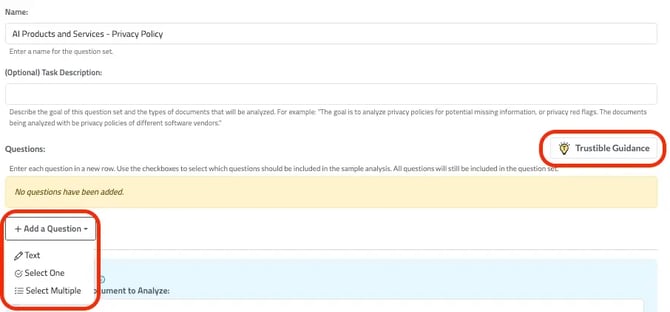
Once a user has named and saved the question set, they can start to add questions. To add a new question select “+Add a Question.” They will be prompted to select from 3 types of question formats:
- Text: Open-ended free text field without a specific expected response.
- Select One: The answer is one option from a defined set.
- Select Multiple: The answer is one or more options from a defined set.
💡Remember to read through Trustible’s Guidance when developing questions!
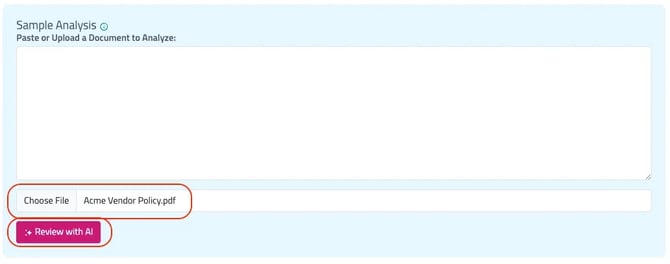
The “Sample Analysis” functionality allows to paste or upload a document, which can provide a preview of whether specific questions are addressed within a given policy or technical document. This is optional.
Once a user is satisfied with the questions, click “Update Question Set” to save.
At the top of the page, click “AI Analyzer” to return to the AI Analyzer home page. From there, a user can create a report.