To begin this process, users must first complete the use case task, “Initial Risk Questionnaire.” The risk matrix is organized around five risk categories: Performance, Data Privacy, Cybersecurity, Ethical, and Legal. Based on your answers to the risk questionnaire, each risk category will display a risk rating of very low to very high.
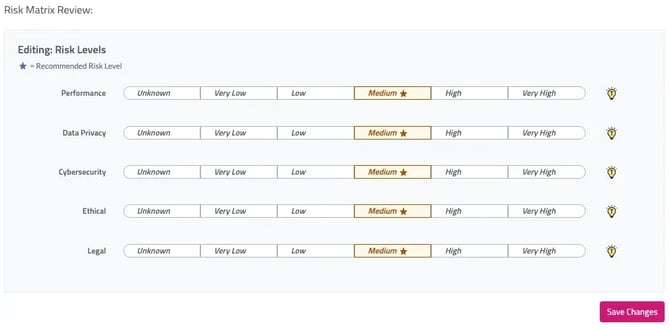
The initial set of ratings, denoted by the ⭐ icon are Trustible’s recommendations. You can edit them as needed by clicking the preferred value. You will then be prompted to include a reason for overriding the value - remember to click Save Changes.

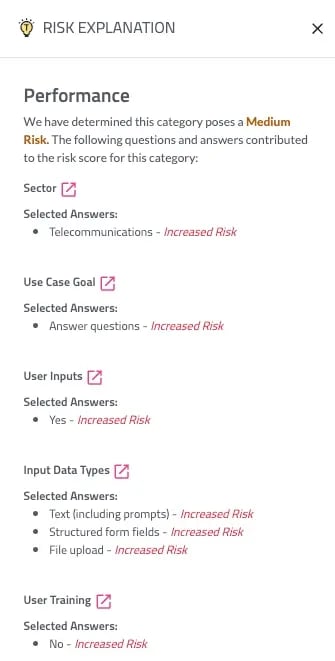
To glean insights into how the risk levels are calculated, click on the Trustible lightbulb for each category. A pop-out with a full risk explanation of how the risk questionnaire responses impact the score will appear.
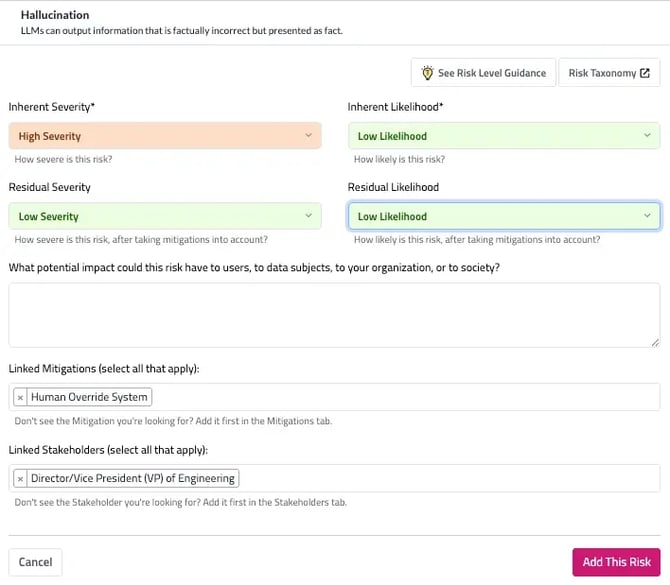
To help users evaluate the potential impact of newly registered risks, the Risk Guidance Matrix is now available directly on the Risk object. This matrix calculates inherent and residual risk by combining likelihood and severity, giving teams an at-a-glance understanding of risk level.
This enhancement supports clearer, more consistent risk evaluation at the individual level across categories—from Bias and Fairness to Operational, Legal, and Security—empowering users to better understand implications and prioritize mitigation efforts.