
Managing Teams
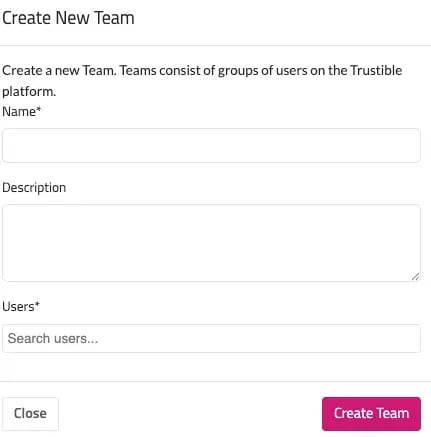
• Create Team → name, description, add users
• From the Teams list:
◦ Delete Team (ownership transfers to you)
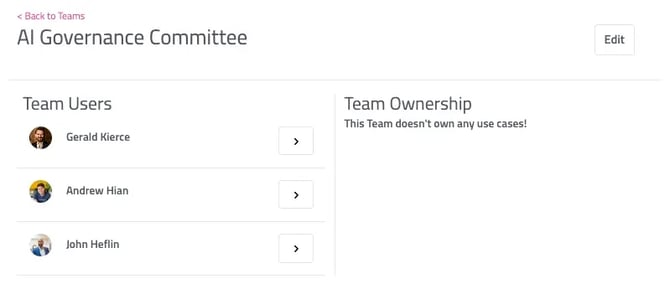
◦ View More for team members and owned use cases
◦ Edit team details
◦ Back to Teams to return to the main view
A team on the Trustible Platform is a selected group of individual users that should be responsible for certain aspects of your organization’s AI governance process. Information about your organization’s teams can be found under “Teams.” Users on a team can be assigned certain task as part of documenting information about your organization’s use cases.
Creating Teams
To create a team, click the “Create Team” button that can be found on the right-hand side of the screen next to the “Teams” heading. Clicking “Create Team” will provide you with a pop-up that will ask for the new team’s name, description, and what users are assigned to the team. To add multiple users, click the user names from the drop-down and they will automatically populate the users field.
Managing Teams
You can view additional team information by clicking the “View More” button. This will navigate you to a page that displays all the users in the team and user cases that the team owns, which is listed under “Team Ownership.” To edit team information, click the “Edit” button in top-right hand side of the screen. To navigate back to the main team’s page, click “Back to Teams.”
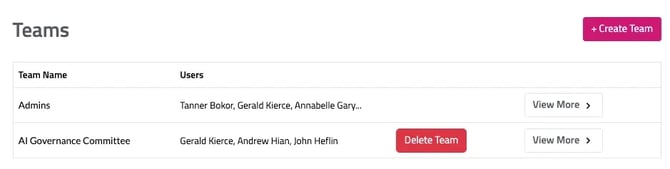
You can delete a team by clicking “Delete Team.” Please note that deleting a team will automatically transfer use case and record ownership to you.