The AI Policy Analyzer reviews your policy and provides an automated compliance gap analysis in minutes. It highlights missing sections relative to major frameworks, including:
• EU AI Act
• NIST AI RMF
• ISO 42001
This makes it easy to see where your policy needs improvement to meet standards.
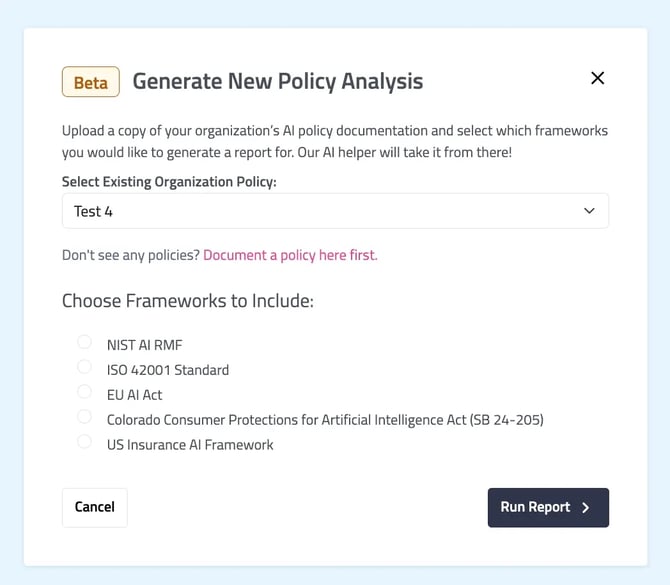
You will be asked to select the applicable policy and the what framework to include. Click “run Report” once you make your selections. You will be navigated to the AI Policy Analysis page where you policy should appear with a “Queued” status. Refresh the page to check if the analyzer has completed its review.
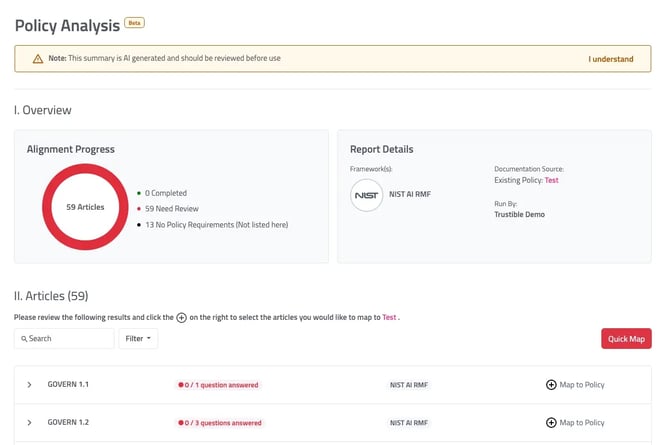
Once a policy has been analyzed, you will be navigated to the Policy Analysis page. Here you will see the overview of the policy’s alignment with the chosen framework and the framework articles that map to your policy. You can review each framework article and question that interrogated you policy. When satisfied, you can map the framework article to your policy. You can quickly map any policy articles that are fully answered on the Policy Analysis page by clicking the “Quick Map” button on the right-hand side of the screen.