
This release focuses on giving you a clearer picture of what's happening across your governance program: new visibility into AI agents, more ways for your team to collaborate on workflows, and a better sense of where each governance process stands.
In this release:
Trustible as a Vendor
As a purpose-built AI governance platform, Trustible has built a vendor profile available in the platform to provide governance teams visibility into our documentation. Streamlining reviews and ensuring team’s have access to the information they need to assess our vendor risk.
Trustible’s AI Capabilities as Templates
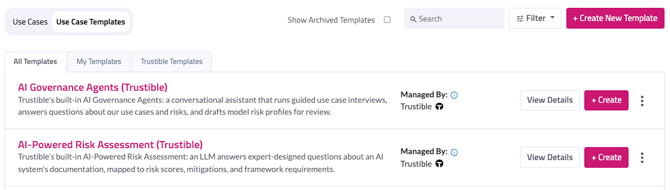
As we continue to build new AI capabilities, we understand that customers may want to review them with their governance teams. To expedite reviews, we’ve documented our ai capabilities now available in two templates!
Agent Cards
AI agents now have their own place in your inventory. Instead of tracking agents as a workaround inside an existing item type, you can create a dedicated Agent Card with fields built for how agents actually work: capabilities, linked items, documentation, and attributes.
Each Agent Card also comes with its own risk matrix, so you can assess an agent's risk the same way you would a use case or a model.
Read more about the information captured on our standard agent card here.
💡 Agent Cards are currently available in demo environments only. Please reach out to support@trustible.ai for more information.
Notifications & Daily Digest
We’re building out notifications to streamline daily notifications. In our first release, we’ve included “@” mentions in comments, model card creations, and completed workflows.
💡 Which email notification would you like to see in your daily digest? Please reach out to support@trustible.ai to provide your input.
Note: Daily Digest is available upon request. Reach out to your Customer Success Manager to enable this for your organization.
Workflow Comments & Mentions
Governance work is a collaborative cross-functional effort. Communication should be documented, centralized, and visible to users. You can include @-mention in a comment, which will bring a colleague into the use case conversation. Mentioned teammates get notified by email, so nothing gets lost waiting for someone to check back in.
Metrics Taxonomy
This release lays the groundwork for tracking how your AI systems are actually performing. The new Metrics Taxonomy gives you a foundation for defining performance and monitoring metrics and applying them consistently across your use cases.
This is a building block for future monitoring capabilities, so expect more here in upcoming releases.
💡 Metrics Taxonomy is currently available in demo environments only. Please reach out to support@trustible.ai for more information.
Rule-Driven Workflow Recommendations
Choosing the right governance process for a use case can take some guesswork, especially as your inventory grows. Now, workflows can be recommended automatically based on rules you define, so allow organizations to consistently recommend workflows based on their organizational priorities.
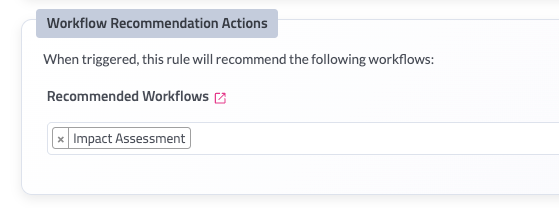
For Admins: Workflow recommendation rules are configured in Governance Studio alongside your existing Rules.
Agent Update: Workflow & Task Progress Tracking
It's now easier to see how far along a governance process is without digging into every task. Workflows report their progress directly, giving you an at-a-glance view of where things stand.

Agent Update: Risk Matrix Widget
Risk is easier to reason about when you can see it. The new Risk Matrix Widget plots likelihood and impact together in a single visual, and it's available on both use cases and Agent Cards.
.png?width=670&height=321&name=Screenshot%202026-08-19%20at%209.43.19%20PM%20(1).png)
Bulk Create Users and Departments
Setting up a new team used to mean adding users and departments one at a time. Admins can now create many users and departments in a single action, which makes onboarding a new team or department considerably faster.
For users: Navigate to Users & Teams > Users > + Bulk Add Users > Download the spreadsheet and format your users to ensure their first and last names, email address, and roles are configured correctly.
For departments: Navigate to Users & Teams > Departments > + Bulk Add Departments > Download the spreadsheet and list your departments.
For Admins: Bulk creation is available from the Admin section of Gov Studio.
Minor Updates
- Periodic review improvements, including the ability to override the next review date instead of relying solely on the default schedule.
- A cleaner experience for building and editing workflow templates.
- Streamlined use case navigation tabs, making it easier to find the section you need.
- Admins can now update the submitter on a use case (Person > Edit).
- Attributes can be added directly from Governance Studio modals, without leaving your current screen.
- API tokens now support configurable expiration, so admins can set a token lifetime that fits their security requirements.
- The risk confirmation justification field now allows a longer response.
- Departments are now sorted alphabetically in dropdowns.
- OMB controls have been added to the framework library.
- AI agent chat is faster and more reliable, with a number of interface improvements.
Bug Fixes
No bug fixes were included in this release cycle.