
This release gives you visibility into AI use you may not even know is happening, a redesigned home base for your dashboards, and a handful of upgrades that make everyday governance work faster, from smarter mitigation suggestions to a visual map of what's actually driving your risk scores.
In this release:
AI Agent & App Scanner
Most organizations don't have a full picture of where AI is actually running. Teams spin up agents, connect models, and build on new platforms faster than any manual inventory process can keep up with, which means real risk can sit outside your governance program without anyone noticing.
The AI Agent & App Scanner closes that gap. It automatically looks across your organization's cloud platforms and surfaces the AI agents and apps already in use, so you can bring them into Trustible instead of hoping someone remembers to log them by hand.
What's included in this release:
- Automatic discovery for AWS Bedrock, Anthropic, and Azure AI Foundry.
- Support for Copilot Studio and Google Cloud Platform is built and on the way.
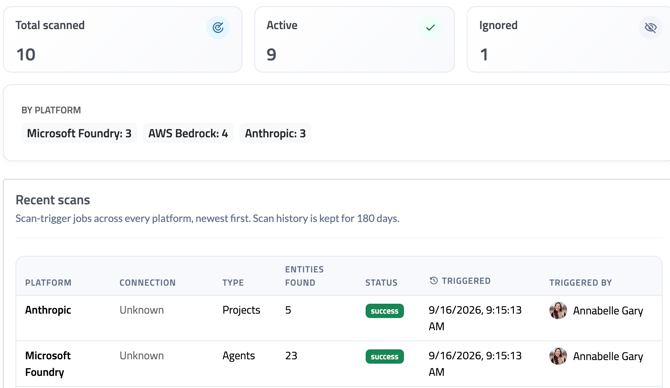
💡 Admin note: This capability is in beta. If you'd like early access to the Scanner for your organization, reach out to support@trustible.ai.
Redesigned & Customizable Dashboards
Dashboards have been rebuilt from the ground up to make it easier to understand your governance program at a glance. Expect a cleaner layout, quicker load times, and a more intuitive path to the information you check most often.
Trustible's standard dashboards can be duplicated and modified.
AI Chat Agent: Filling In Use Cases From Documents
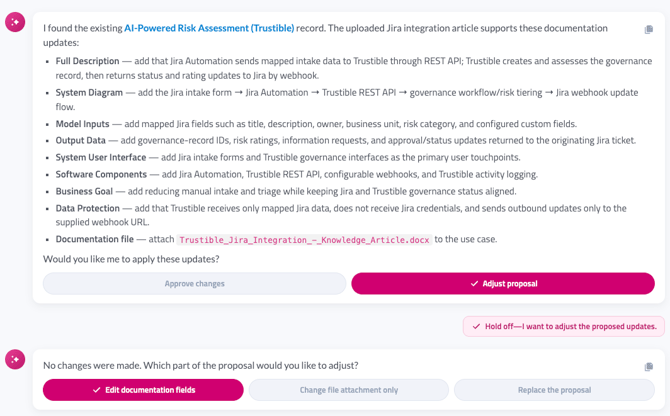
Filling out a use case record by hand is tedious, especially when the answers already live in a document you've already written. Now you can hand that document to the AI Chat Agent instead.
Upload a document in chat, and the Agent will read it and propose values for the relevant fields on an existing use case, whether that means filling in blanks or updating what's already there. Nothing changes on the record until you review the suggestions and approve them, so you stay in control of what actually gets saved.
Email-Based Two-Factor Login
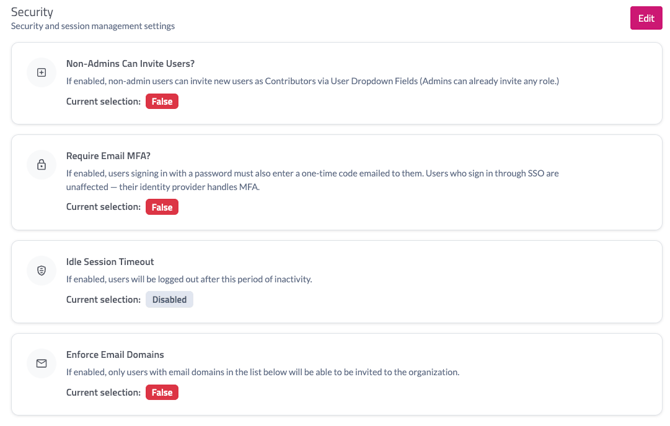
Not every organization is ready to roll out full single sign-on, but that shouldn't mean choosing between convenience and security. Admins can now require a one-time code sent by email as a second step at login, giving your organization stronger protection without the setup lift of SSO.
💡 Admin note: Go to Your Organization > Security Settings > Require Email MFA?
Here you'll see options to allow contributors to invite users, set the email multi-factor authentication, set an Idle session timeout value, and enforce which organizational email domains are acceptable.
Trustible Agent Updates
The agent can now support the following:
- Attach files without leaving chat. You can now attach a file you've uploaded in chat directly to a use case, a model or vendor record, or a specific documentation field, no need to navigate to another tab to finish the work.
- AI answers now account for attached files. "Answer with AI" and "Review with AI" now consider every file already attached to a use case, model, or vendor, not just typed text, when putting together an answer or a review.
- Guiding questions look at attached files too. When judging whether a documentation field is sufficiently answered, the guiding questions analysis now takes into account a file attached directly to that field.
- Smoother conversations. The Agent now gives clearer responses when you ask it for something it can't do, no longer gets stuck re-showing a form field that isn't responding, and can reassign tasks or look up teammates by name, all from within chat.
- A faster, more capable model. Agent Chat is now running on an upgraded model, which means quicker and more accurate responses.
History, Approvals, and Policy Controls
A handful of smaller improvements to how teams track changes and manage workflows:
- Use Case History shows real values. Instead of a generic "Updated" label, history entries now show the actual before and after values for a change.
- More flexible Approval Tasks. Approval Tasks can now be configured to skip the requirement that prior tasks be completed first, and support custom instruction text in the approval modal.
- Framework filter for Policy Controls. The Policy Control modal now includes a filter by Framework, and control refresh runs in the background after you save so you're not left waiting.
- Clearer control counts. Changing a use case's designation now shows you a clearer picture of how many controls are affected.
A Visual Map of Your Risk Scoring
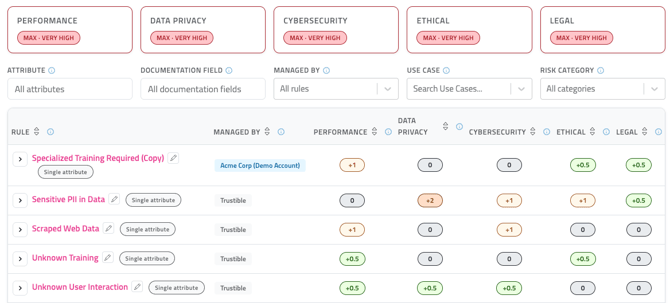
This release adds a visual model of your organization's risk model, so you can see exactly which rules are shaping your risk scores and adjust them all from one place. Reach out to support@trustible.ai to discuss and learn more about risk calibration.
Rule-Base Mitigation Suggestions
Trustible now supports suggested mitigations for custom rules. These mitigations are dynamically updated on each record based on the information of a specific use case.
Governance Studio Bulk Configuration
Admins can now upload an Excel workbook to create attributes, documentation fields, and rules to accelerate custom onboarding configuration.
Bug Fixes
Fixed an issue where organizations using only the new AI Agent (not the older assistant) received an error when submitting chat feedback.